
tobac example: Tracking of deep convection based on OLR from convection permitting model simulations#
This example notebook demonstrates the use of tobac to track deep convection based on the outgoing longwave radiation (OLR) from convection permitting simulations.
The simulation results used in this example were performed as part of the ACPC deep convection intercomparison case study (http://acpcinitiative.org/Docs/ACPC_DCC_Roadmap_171019.pdf) with WRF using the Morrison microphysics scheme. Simulations were performed with a horizontal grid spacing of 4.5 km.
The data used in this example is downloaded from Zenodo automatically as part of the notebooks.
Import libraries:
[1]:
# Import a range of python libraries used in this notebook:
import datetime
import shutil
from pathlib import Path
from six.moves import urllib

import numpy as np
import pandas as pd
import xarray as xr

import matplotlib.pyplot as plt
%matplotlib inline
[2]:
# Import tobac itself:
import tobac
print('using tobac version', str(tobac.__version__))
using tobac version 1.6.2
[3]:
# Disable a few warnings:
import warnings
warnings.filterwarnings('ignore', category=UserWarning, append=True)
warnings.filterwarnings('ignore', category=RuntimeWarning, append=True)
warnings.filterwarnings('ignore', category=FutureWarning, append=True)
warnings.filterwarnings('ignore',category=pd.io.pytables.PerformanceWarning)
[4]:
#Set up directory to save output and plots:
savedir=Path("Save")
if not savedir.is_dir():
    savedir.mkdir()
plot_dir=Path("Plot")
if not plot_dir.is_dir():
    plot_dir.mkdir()
[5]:
data_out=Path('../')
[6]:
# Download the data: This only has to be done once for all tobac examples and can take a while
data_file = list(data_out.rglob('data/Example_input_OLR_model.nc'))
if len(data_file) == 0:
    file_path='https://zenodo.org/records/3195910/files/climate-processes/tobac_example_data-v1.0.1.zip'
    #file_path='http://zenodo..'
    tempfile=Path('temp.zip')
    print('start downloading data')
    request=urllib.request.urlretrieve(file_path, tempfile)
    print('start extracting data')
    shutil.unpack_archive(tempfile, data_out)
    tempfile.unlink()
    print('data extracted')
    data_file = list(data_out.rglob('data/Example_input_OLR_model.nc'))
[7]:
#Load Data from downloaded file:
OLR = xr.open_dataset(data_file[0]).OLR
[8]:
OLR
[8]:
<xarray.DataArray 'OLR' (time: 96, south_north: 110, west_east: 132)> Size: 6MB
[1393920 values with dtype=float32]
Coordinates:
  * time         (time) datetime64[ns] 768B 2013-06-19T19:05:00 ... 2013-06-2...
  * south_north  (south_north) int64 880B 156 157 158 159 ... 262 263 264 265
  * west_east    (west_east) int64 1kB 201 202 203 204 205 ... 329 330 331 332
    latitude     (south_north, west_east) float32 58kB ...
    longitude    (south_north, west_east) float32 58kB ...
    x            (west_east) float64 1kB ...
    y            (south_north) float64 880B ...
    x_0          (west_east) int64 1kB ...
    y_0          (south_north) int64 880B ...
Attributes:
units: W m-2Data visualisation
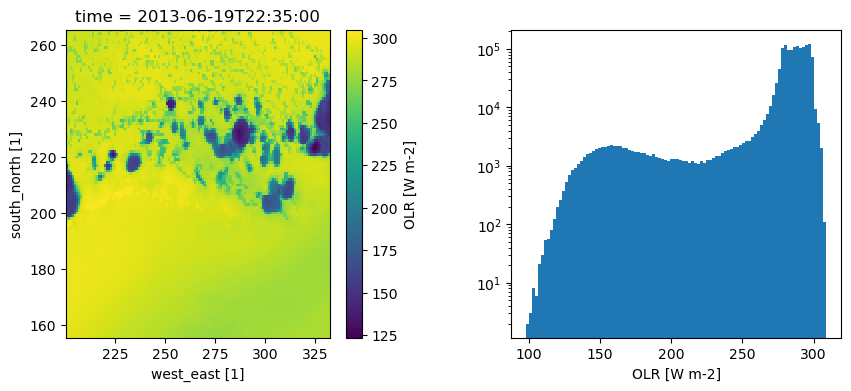
We can take a look at our data both by plotting an individual time step, and by plotting a histogram of the values as shown below:
Visualising the data like this can help make suitable choices for the parameters used in the detection and tracking of features. In this dataset, we can see that the background values range from 275-300 Wm-2, while the coldest features peak around 150 Wm-2
[9]:
plt.figure(figsize=(10,4))

ax1 = plt.subplot(1,2,1)
OLR[42].plot(ax=ax1)

ax2 = plt.subplot(1,2,2)
OLR.plot(ax=ax2, bins=100)
plt.yscale("log")

plt.subplots_adjust(wspace=0.35)
[10]:
# Determine temporal and spatial sampling:
dxy, dt = tobac.get_spacings(OLR)
[11]:
# Dictionary containing keyword arguments for feature detection step (Keywords could also be given directly in the function call).
parameters_features={}
parameters_features['position_threshold']='weighted_diff'
parameters_features['sigma_threshold']=0.5
parameters_features['n_min_threshold']=4
parameters_features['target']='minimum'
parameters_features['threshold']=[250,225,200,175,150]
[12]:
# Perform feature detection:
print('starting feature detection')
Features = tobac.feature_detection_multithreshold(OLR, dxy, **parameters_features)
Features.to_hdf(savedir / 'Features.h5', 'table')
print('feature detection performed and saved')
starting feature detection
feature detection performed and saved
Feature detection returns a dataframe containing information about each detected object, as shown below:
[13]:
Features.head()
[13]:
| frame | idx | hdim_1 | hdim_2 | num | threshold_value | feature | time | timestr | south_north | west_east | latitude | longitude | x | y | x_0 | y_0 | |
|---|---|---|---|---|---|---|---|---|---|---|---|---|---|---|---|---|---|
| 0 | 0 | 5 | 62.743547 | 59.631834 | 9 | 250 | 1 | 2013-06-19 19:05:00 | 2013-06-19 19:05:00 | 218.743547 | 260.631834 | 30.232511 | -92.171414 | 1.175093e+06 | 9.865960e+05 | 260.631834 | 218.743547 |
| 1 | 0 | 8 | 67.672946 | 53.464557 | 6 | 250 | 2 | 2013-06-19 19:05:00 | 2013-06-19 19:05:00 | 223.672946 | 254.464557 | 30.441024 | -92.459497 | 1.147341e+06 | 1.008778e+06 | 254.464557 | 223.672946 |
| 2 | 0 | 11 | 73.655933 | 130.435766 | 5 | 250 | 3 | 2013-06-19 19:05:00 | 2013-06-19 19:05:00 | 229.655933 | 331.435766 | 30.565232 | -88.779386 | 1.493711e+06 | 1.035702e+06 | 331.435766 | 229.655933 |
| 3 | 0 | 12 | 74.385746 | 122.150648 | 6 | 250 | 4 | 2013-06-19 19:05:00 | 2013-06-19 19:05:00 | 230.385746 | 323.150648 | 30.613178 | -89.172567 | 1.456428e+06 | 1.038986e+06 | 323.150648 | 230.385746 |
| 4 | 0 | 17 | 64.398814 | 49.861904 | 8 | 225 | 5 | 2013-06-19 19:05:00 | 2013-06-19 19:05:00 | 220.398814 | 250.861904 | 30.309673 | -92.634448 | 1.131129e+06 | 9.940447e+05 | 250.861904 | 220.398814 |
We can also compare the detected features to the input field to judge whether feature detection has done a good job. Below, we can see that the use of multiple thresholds has allowed the most prominent features (blue) to be detected, as well as less prominent features surrounding them which may represent earlier stages of convective storms
[14]:
frame=42
OLR[frame].plot(cmap="binary")
points = {
    threshold:plt.plot(ft.west_east, ft.south_north, "o")[0]
    for threshold, ft in Features[Features.frame==frame].groupby("threshold_value")
}
plt.legend(list(points.values()), list(points.keys()), title="OLR [W m-2]")
[14]:
<matplotlib.legend.Legend at 0x31dcbeba0>

[15]:
# Dictionary containing keyword options for the segmentation step:
parameters_segmentation={}
parameters_segmentation['target']='minimum'
parameters_segmentation['method']='watershed'
parameters_segmentation['threshold']=250
[16]:
# Perform segmentation and save results:
print('Starting segmentation based on OLR.')
Mask_OLR, Features_OLR = tobac.segmentation_2D(Features, OLR, dxy, **parameters_segmentation)
print('segmentation OLR performed, start saving results to files')
Mask_OLR.to_netcdf(savedir / 'Mask_Segmentation_OLR.nc', encoding={"segmentation_mask":{"zlib":True, "complevel":4}})
Features_OLR.to_hdf(savedir / 'Features_OLR.h5', 'table')
print('segmentation OLR performed and saved')
Starting segmentation based on OLR.
segmentation OLR performed, start saving results to files
segmentation OLR performed and saved
The plot below visualises the segmented areas for one time step, showing how each feature detected previously is now associated with a portion of the domain:
[17]:
plt.figure(figsize=(8.8, 4.8))
OLR[frame].plot(cmap="binary", cbar_kwargs=dict(pad=0.1))
Mask_OLR[frame].where(Mask_OLR[frame]>0).plot(cmap="tab20", alpha=0.75)
[17]:
<matplotlib.collections.QuadMesh at 0x31fdc3890>

[18]:
# Arguments for trajectory linking:
parameters_linking={}
parameters_linking['v_max']=20
parameters_linking['stubs']=2
parameters_linking['order']=1
parameters_linking['extrapolate']=0
parameters_linking['memory']=0
parameters_linking['adaptive_stop']=0.2
parameters_linking['adaptive_step']=0.95
parameters_linking['subnetwork_size']=100
parameters_linking['method_linking']='predict'
[19]:
# Perform linking and save results to file:
Track=tobac.linking_trackpy(Features, OLR, dt=dt, dxy=dxy, **parameters_linking)
Track.to_hdf(savedir / 'Track.h5', 'table')
Frame 95: 12 trajectories present.
Visualisation:
[20]:
# Set extent of maps created in the following cells:
axis_extent = [-95, -89, 28, 32]
[21]:
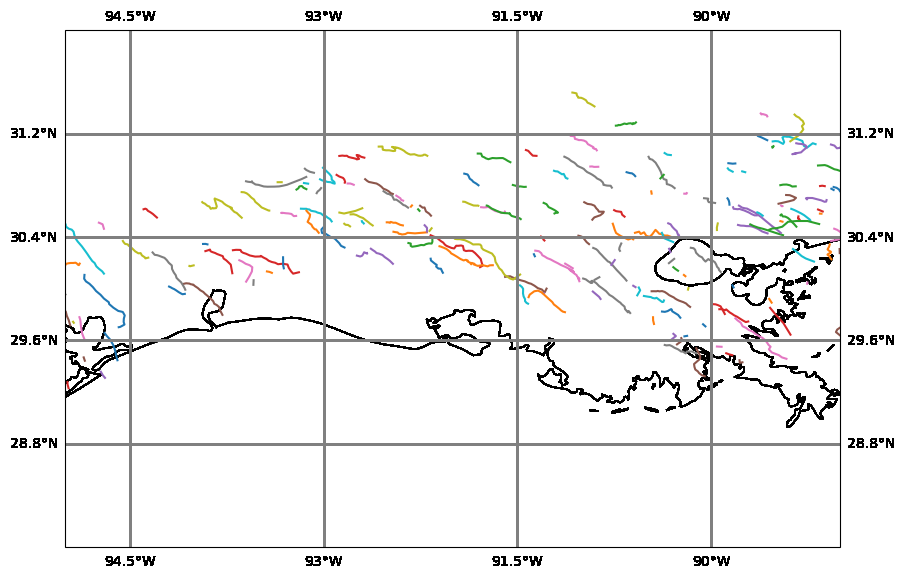
# Plot map with all individual tracks:
import cartopy.crs as ccrs
fig_map, ax_map = plt.subplots(figsize=(10,10), subplot_kw={'projection': ccrs.PlateCarree()})
ax_map = tobac.map_tracks(Track, axis_extent=axis_extent,  axes=ax_map)
Analysis
[22]:
# Lifetimes of tracked clouds:
fig_lifetime, ax_lifetime = plt.subplots()
tobac.plot_lifetime_histogram_bar(Track, axes=ax_lifetime, bin_edges=np.arange(0,200,20), density=False, width_bar=10)
ax_lifetime.set_xlabel('lifetime [min]')
ax_lifetime.set_ylabel('counts')
[22]:
Text(0, 0.5, 'counts')

[23]:
# Create animation of tracked clouds and outlines with OLR as a background field
animation_test_tobac=tobac.animation_mask_field(
    Track, Features, OLR, Mask_OLR,
    axis_extent=axis_extent,
    vmin=80, vmax=330,
    plot_outline=True, plot_marker=True, marker_track='x',
    plot_number=True, plot_features=True
)
[24]:
# Display animation:
from IPython.display import HTML, Image, display
HTML(animation_test_tobac.to_html5_video())
[24]:
<Figure size 640x480 with 0 Axes>