Tracking low clouds in large-eddy simulations#
The dataset we are using is from Cloud Botany.
Cloud Botany is a library of idealised large-eddy simulations forced by and initialised with combinations of simplified vertical profiles. Each profile is parameterised by variables which aim to make the ensemble span a range of conditions corresponding to the variability observed over the EUREC4A region during the boreal winter of 2019/2020.
This notebook was created by: William K. Jones, Milind Sharma, and Julia Kukulies
[1]:
from intake import open_catalog
from datetime import datetime
import numpy as np
import matplotlib.pyplot as plt
import warnings
warnings.filterwarnings("ignore", category=FutureWarning)
[2]:
# Import tobac itself
import tobac
#print('using tobac version', str(tobac.__version__))
[3]:
# Open EUREC4A catalogue to access data
cat = open_catalog("https://raw.githubusercontent.com/eurec4a/eurec4a-intake/master/catalog.yml")
[4]:
# Open the cloud botany LES catalogue
cloud_botany = cat.simulations.DALES.botany
cloud_botany
botany:
  args:
    path: https://raw.githubusercontent.com/eurec4a/eurec4a-intake/master/Simulations/DALES/botany.yaml
  description: Cloud botany LES ensemble
  driver: intake.catalog.local.YAMLFileCatalog
  metadata:
    catalog_dir: https://raw.githubusercontent.com/eurec4a/eurec4a-intake/master/Simulations/DALES
[5]:
# Load 2D cloud fields into an xarray dataset
ds = cloud_botany.dx100m.nx1536["2D"].to_dask()
ds
[5]:
<xarray.Dataset> Size: 8TB
Dimensions:    (member: 103, time: 720, yt: 1536, xt: 1536)
Coordinates:
  * member     (member) int32 412B 1 2 3 4 5 6 7 8 ... 97 98 99 100 101 102 103
  * time       (time) datetime64[ns] 6kB 2020-02-01T00:05:00 ... 2020-02-03T1...
  * yt         (yt) float64 12kB 50.0 150.0 250.0 ... 1.534e+05 1.536e+05
  * xt         (xt) float64 12kB 50.0 150.0 250.0 ... 1.534e+05 1.536e+05
Data variables:
    capemax    (member, time, yt, xt) float32 700GB dask.array<chunksize=(1, 32, 256, 256), meta=np.ndarray>
    cinmax     (member, time, yt, xt) float32 700GB dask.array<chunksize=(1, 32, 256, 256), meta=np.ndarray>
    cldtop     (member, time, yt, xt) float32 700GB dask.array<chunksize=(1, 32, 256, 256), meta=np.ndarray>
    hinvsrf    (member, time, yt, xt) float32 700GB dask.array<chunksize=(1, 32, 256, 256), meta=np.ndarray>
    hmix       (member, time, yt, xt) float32 700GB dask.array<chunksize=(1, 32, 256, 256), meta=np.ndarray>
    lwp        (member, time, yt, xt) float32 700GB dask.array<chunksize=(1, 32, 256, 256), meta=np.ndarray>
    rwp        (member, time, yt, xt) float32 700GB dask.array<chunksize=(1, 32, 256, 256), meta=np.ndarray>
    surfprec   (member, time, yt, xt) float32 700GB dask.array<chunksize=(1, 32, 256, 256), meta=np.ndarray>
    thetavmix  (member, time, yt, xt) float32 700GB dask.array<chunksize=(1, 32, 256, 256), meta=np.ndarray>
    twp        (member, time, yt, xt) float32 700GB dask.array<chunksize=(1, 32, 256, 256), meta=np.ndarray>
    umix       (member, time, yt, xt) float32 700GB dask.array<chunksize=(1, 32, 256, 256), meta=np.ndarray>
    vmix       (member, time, yt, xt) float32 700GB dask.array<chunksize=(1, 32, 256, 256), meta=np.ndarray>
Attributes:
    CDI:          Climate Data Interface version 2.0.4 (https://mpimet.mpg.de...
    CDO:          Climate Data Operators version 2.0.4 (https://mpimet.mpg.de...
    Conventions:  CF-1.6
    history:      Thu May 26 04:40:08 2022: cdo -f nc4 -z zip_6 -r -O collgri...
title: 000/cape.x000y000.001.ncSelect atmospheric variable to track on#
We choose the liquid water path (LWP) in kg m\(^{-2}\) to track the evolution of shallow convection.
[6]:
# Select a shorter time period (here: 4 hours) and ensemble member and load the data into memory
lwp_selected = ds.lwp.sel(member= 42,time=slice(datetime(2020,2,2,10), datetime(2020,2,2,14))).compute()
Look at input data#
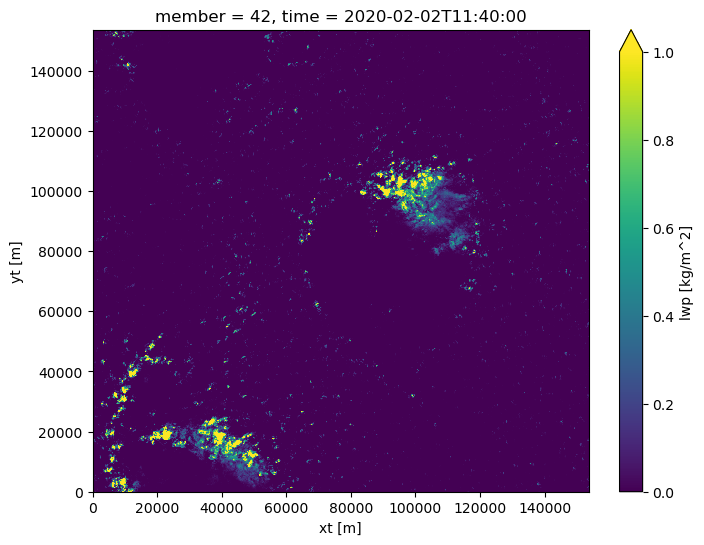
[7]:
# choose a timestep
tt = 20

plt.figure(figsize=(8,6))
lwp_selected[tt].plot(vmax = 1)
plt.show()
Plot histogram of LWP values with chosen thresholds#
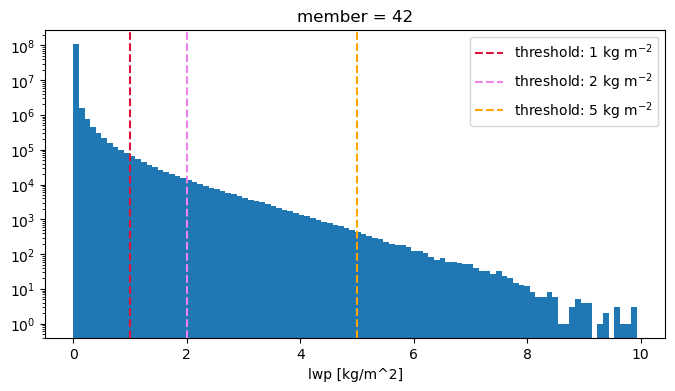
We choose the thresholds 1 kg m\(^{-2}\), 2 kg m\(^{-2}\) and 5 kg m\(^{-2}\) to identify cloud features in the simulations.
[8]:
plt.figure(figsize= (8,4))
lwp_selected.plot(bins=100)
plt.axvline(x= 1 , color="crimson", linestyle="--", label = 'threshold: 1 kg m$^{-2}$')
plt.axvline(x= 2 , color="violet", linestyle="--", label = 'threshold: 2 kg m$^{-2}$')
plt.axvline(x= 5 , color="orange", linestyle="--", label = 'threshold: 5 kg m$^{-2}$')
plt.legend()
plt.yscale("log")
Feature detection#
! Note that the simulations we are looking at have periodic boundary conditions, so we use the PBC_flag= ‘both’ option to be able to detect and track features across the boundaries.
[9]:
# Dictionary containing keyword options (could also be directly given to the function)
dxy, dt = 100, 300
parameters_features={}
parameters_features['threshold']=[1, 2, 5] #kg/m^2
parameters_features['n_min_threshold']= 20
parameters_features['PBC_flag'] ="both"
[10]:
Features = tobac.feature_detection_multithreshold(lwp_selected, **parameters_features)
[11]:
Features.head()
[11]:
| frame | idx | hdim_1 | hdim_2 | num | threshold_value | feature | time | timestr | member | xt | yt | |
|---|---|---|---|---|---|---|---|---|---|---|---|---|
| 0 | 0 | 7 | 85.734378 | 1114.734362 | 64 | 1 | 1 | 2020-02-02 10:00:00 | 2020-02-02 10:00:00 | <xarray.DataArray 'member' ()> Size: 4B\narray... | 111523.436245 | 8623.437775 |
| 1 | 0 | 9 | 92.918039 | 1168.967222 | 61 | 1 | 2 | 2020-02-02 10:00:00 | 2020-02-02 10:00:00 | <xarray.DataArray 'member' ()> Size: 4B\narray... | 116946.722180 | 9341.803914 |
| 2 | 0 | 10 | 94.566676 | 1121.611270 | 90 | 1 | 3 | 2020-02-02 10:00:00 | 2020-02-02 10:00:00 | <xarray.DataArray 'member' ()> Size: 4B\narray... | 112211.127021 | 9506.667605 |
| 3 | 0 | 14 | 108.615384 | 1127.269230 | 26 | 1 | 4 | 2020-02-02 10:00:00 | 2020-02-02 10:00:00 | <xarray.DataArray 'member' ()> Size: 4B\narray... | 112776.922965 | 10911.538417 |
| 4 | 0 | 19 | 113.772727 | 913.045455 | 22 | 1 | 5 | 2020-02-02 10:00:00 | 2020-02-02 10:00:00 | <xarray.DataArray 'member' ()> Size: 4B\narray... | 91354.545530 | 11427.272664 |
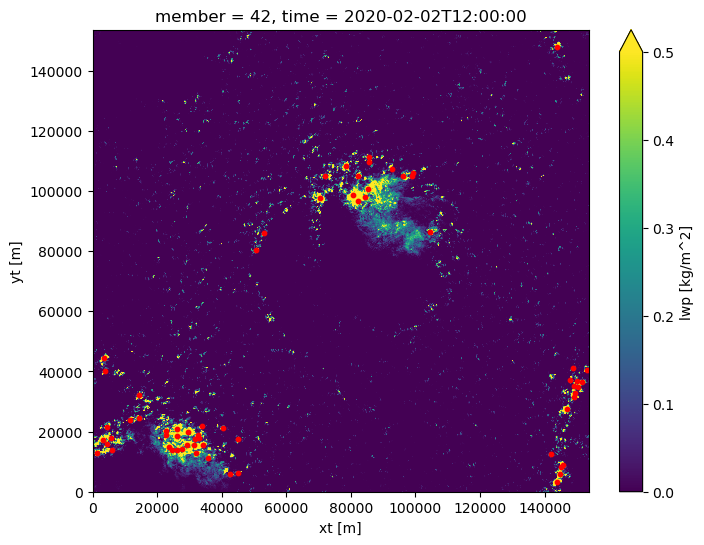
Look at detected features in a specific time step#
[12]:
tt = 24

plt.figure(figsize=(8,6))
lwp_selected[24].plot(vmax=0.5)
plt.scatter(Features[Features.frame==tt].xt, Features[Features.frame==tt].yt, c="red", s = 10)
plt.show()
Tracking of detected cloud features#
[13]:
Tracks = tobac.linking_trackpy(
    Features, None, dt=300, dxy=100, v_max=10, method_linking="predict",
    adaptive_stop=0.2,
    adaptive_step=0.95,
    stubs=4,
    # subnetwork_size=100,
    min_h1=0,
    max_h1=1536,
    min_h2=0,
    max_h2=1536,
    PBC_flag='both')
Frame 48: 42 trajectories present.
[14]:
# remove cells that are not tracked
Tracks= Tracks[Tracks.cell > 0]
Tracks.head()
[14]:
| frame | idx | hdim_1 | hdim_2 | num | threshold_value | feature | time | timestr | member | xt | yt | cell | time_cell | |
|---|---|---|---|---|---|---|---|---|---|---|---|---|---|---|
| 4 | 0 | 19 | 113.772727 | 913.045455 | 22 | 1 | 5 | 2020-02-02 10:00:00 | 2020-02-02 10:00:00 | <xarray.DataArray 'member' ()> Size: 4B\narray... | 91354.545530 | 11427.272664 | 5 | 0 days |
| 11 | 0 | 39 | 163.394724 | 853.131573 | 38 | 1 | 12 | 2020-02-02 10:00:00 | 2020-02-02 10:00:00 | <xarray.DataArray 'member' ()> Size: 4B\narray... | 85363.157280 | 16389.472389 | 12 | 0 days |
| 12 | 0 | 41 | 166.478888 | 960.380290 | 71 | 1 | 13 | 2020-02-02 10:00:00 | 2020-02-02 10:00:00 | <xarray.DataArray 'member' ()> Size: 4B\narray... | 96088.028990 | 16697.888776 | 13 | 0 days |
| 44 | 0 | 154 | 897.999995 | 1443.076923 | 26 | 1 | 45 | 2020-02-02 10:00:00 | 2020-02-02 10:00:00 | <xarray.DataArray 'member' ()> Size: 4B\narray... | 144357.692321 | 89849.999485 | 45 | 0 days |
| 51 | 0 | 187 | 1009.777776 | 118.111100 | 27 | 1 | 52 | 2020-02-02 10:00:00 | 2020-02-02 10:00:00 | <xarray.DataArray 'member' ()> Size: 4B\narray... | 11861.109995 | 101027.777639 | 52 | 0 days |
Look at track#
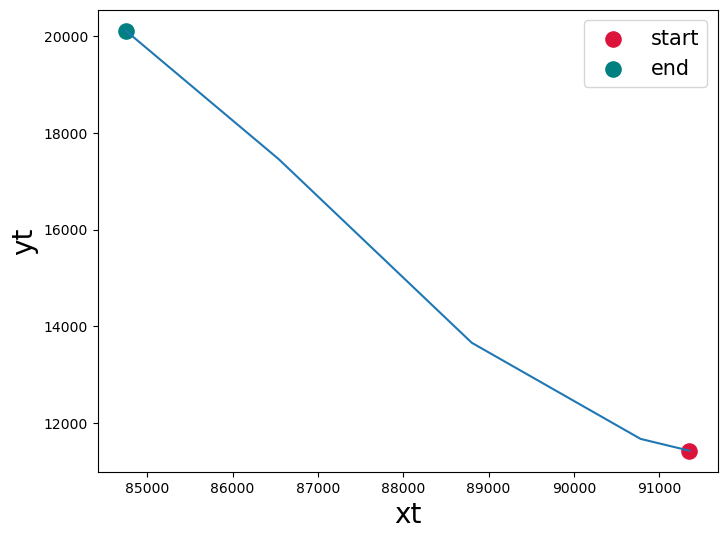
[15]:
cell = 5

plt.figure(figsize=(8,6))
plt.plot(Tracks[Tracks.cell==cell].xt, Tracks[Tracks.cell==cell].yt)
plt.scatter(Tracks[Tracks.cell==cell].xt.values[0], Tracks[Tracks.cell==cell].yt.values[0], label = 'start', s = 120, c = 'crimson')
plt.scatter(Tracks[Tracks.cell==cell].xt.values[-1], Tracks[Tracks.cell==cell].yt.values[-1], label = 'end', s = 120 , c = 'teal')
plt.legend(loc = 'upper right', fontsize = 15 )
plt.xlabel('xt', fontsize = 20)
plt.ylabel('yt', fontsize = 20 )
plt.show()
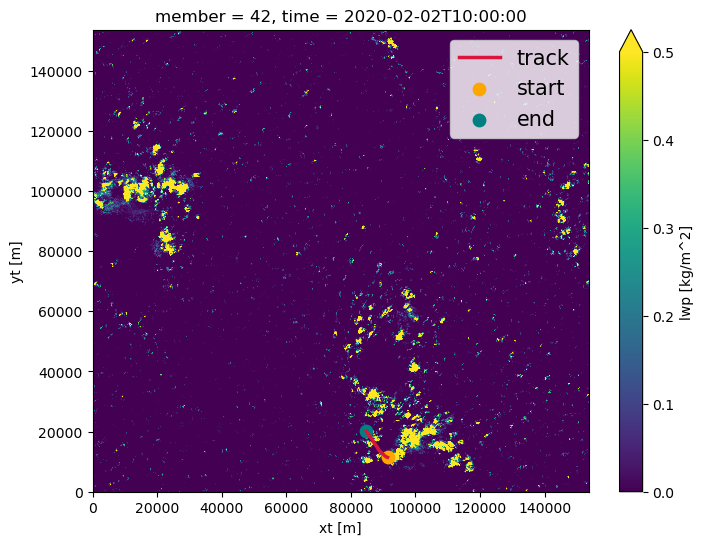
Where in the domain do we find this track?#
[16]:
# select cell
frame = Tracks[Tracks.cell == cell].frame.values[0]

plt.figure(figsize=(8,6))
# plot the data for the first timeframe of cell
lwp_selected[frame].plot(vmax=0.5)
plt.plot(Tracks[Tracks.cell==cell].xt, Tracks[Tracks.cell==cell].yt, color = 'crimson', linewidth = 2.5, label = 'track')
plt.scatter(Tracks[Tracks.cell==cell].xt.values[0], Tracks[Tracks.cell==cell].yt.values[0], label = 'start', s = 80, c = 'orange')
plt.scatter(Tracks[Tracks.cell==cell].xt.values[-1], Tracks[Tracks.cell==cell].yt.values[-1], label = 'end', s = 80 , c = 'teal')
plt.legend(loc = 'upper right', fontsize = 15 )
plt.show()
Segmentation#
[17]:
# Set parameters for segmentation

parameters_segmentation={}
parameters_segmentation['target']='maximum'
parameters_segmentation['method']='watershed'
parameters_segmentation['threshold']= 0.5
parameters_segmentation['PBC_flag']="both"

# get the LWP summed over all segmented grid cells that belong to a feature
parameters_segmentation["statistic"] = {'lwp_sum': np.sum}
[18]:
mask, segmented_features = tobac.segmentation_2D(Tracks, lwp_selected, dxy = dxy, **parameters_segmentation)
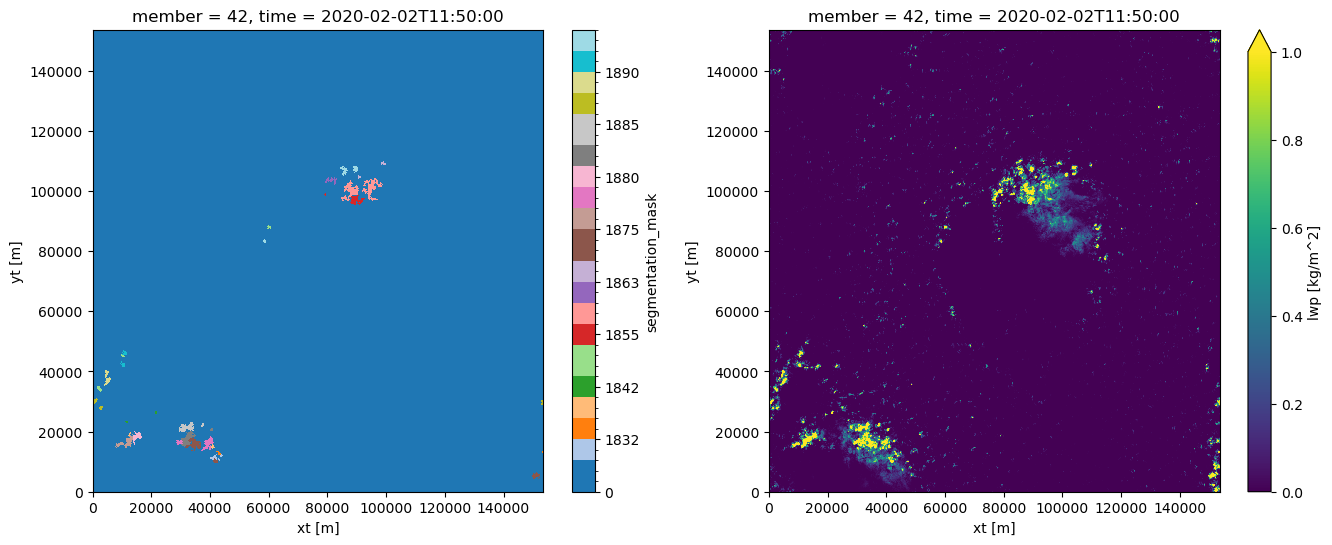
Look at the mask output#
[19]:
from matplotlib.colors import ListedColormap, BoundaryNorm

plt.figure(figsize= (16,6))

# choose a timestep
tt = 22

# plot mask
labels = np.unique(mask[tt])
colors = plt.cm.tab20(np.linspace(0, 1, labels.size))
cmap = ListedColormap(colors)
norm = BoundaryNorm(labels, labels.size)
ax = plt.subplot(1,2,1)
m = mask[tt].plot(ax = ax, cmap = cmap, norm = norm )

# plot field
ax = plt.subplot(1,2,2)
lwp_selected[tt].plot(ax = ax, vmax = 1 )

plt.show()
Lifecycle analysis#
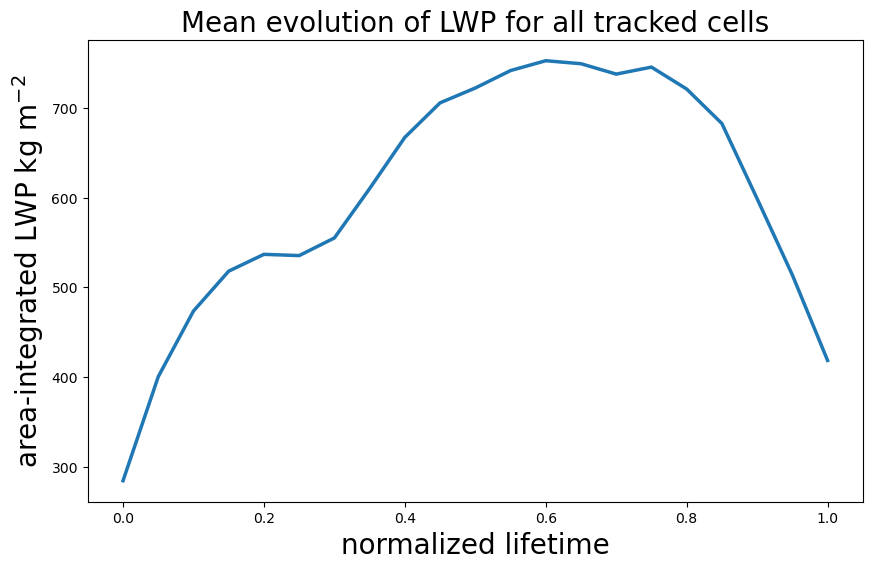
Let’s have a look at the lifecycle of the clouds by analyzing their evolution of LWP during the tracking.
For this, we:
first pick all cells that persist longer than 30 minutes
normalize each lifecycle on a scale between 0 and 1 so that the lifetimes are comparable
interpolate the area-integrated LWP (that we got from passing the statistic parameters in the segmentation step) onto the normalized lifetimes
The output of this analysis will be a lifecycle composite showing the mean evolution of LWP over all tracked cloud cells.
Filter out long-lived cells#
[20]:
# find the maximum for each unique cell
max_times = segmented_features.groupby('cell').time_cell.max()
# subset times by selecting only cells that have a maximum time longer than 30 min
long_times= max_times[max_times >= np.timedelta64(30, "m")]
# use a boolean mask to subset the original dataframe
matched_cells = np.isin(segmented_features.cell, long_times.index)
long_lived_cells = segmented_features[matched_cells]
Convert lifetimes into normalized lifetimes on a scale from 0 to 1#
[21]:
from scipy.interpolate import interp1d

def get_normalized_lifecycle(cell, var = 'lwp_sum', bins = np.arange(0,1.05,0.05)):
    '''
    This function interpolates the values of a given variable

    Parameters:
        cell (pd.DataFrame): dataframe for selected unique cell
        var (str): variable to interpolate
        bins(np.array): bins on normalized lifetime scale that serve as coordinates for interpolation

    Returns:
        interpolated (np.array): array with the shape of the given bins containing the interpolated values

    '''
    lifetime = cell.time.size
    time_percentage = np.linspace(0, 1, lifetime)
    interp_func = interp1d(time_percentage, cell[var] , kind = 'linear', fill_value = 'extrapolate')
    interpolated = interp_func(bins)
    return interpolated
[22]:
# Loop through all individual cells and get their LWP evolution on the normalized lifetime dimension

# list to store the
all_cells = []

for cell in long_lived_cells.cell.unique():
    # select unique cell
    cell_df = long_lived_cells[long_lived_cells.cell == cell]
    # get the interpolated LWP values along the normalized time dimension
    interpolated_lwp = get_normalized_lifecycle(cell_df)
    all_cells.append(interpolated_lwp)

lwp_composite = np.nanmean(all_cells, 0)
[23]:
plt.figure(figsize= (10,6))

fs = 20 # fontsize

plt.plot(lwp_composite, lw = 2.5)
plt.title('Mean evolution of LWP for all tracked cells', fontsize= fs )
plt.xticks(np.arange(0,lwp_composite.size)[::4], np.round(np.arange(0,1.05,0.05)[::4], decimals = 2))
plt.ylabel('area-integrated LWP kg m$^{-2}$', fontsize=  fs)
plt.xlabel('normalized lifetime', fontsize = fs )
plt.show()